

TIFF came into being as one of the first image formats that was well ahead of its time. Decades later, many still rely on TIFF, especially when users don’t want to compromise on the quality of prints and photography. However, since JPEG entered the market, the TIFF vs JPEG comparison became ever so prominent, mainly because the surge in TIFF to JPEG conversion was something that could no longer be ignored. And it’s not because TIFF fell out of popularity, but more so how JPEG was reshaping the image format industry.
This TIFF vs JPEG rivalry has little to do with superiority but more with which image format best fits where. And if you, too, find yourself in a similar boat, where JPEG is better suited between TIFF vs JPEG, and you must convert TIFF to JPEG, there are free online tools that will effortlessly deliver conversions that fit your desirability.
What is a TIFF File?
TIFF, which you may have often come across as .tiff or .tif, is predominantly considered a classic image format. It uses information formatted as tags, and that is where the “tagged” in Tagged Image File Format (TIFF) comes from. These tags include image width, image height, color depth, compression type, and metadata such as camera info, author, and timestamps.
TIFF is one of the earlier formats, and despite that, where all its initial rivals have faded out, TIFF still holds its place. TIFF was considered a revolutionary image format of its time, where it supported lossless compression, and no matter the amount of resaves, images in TIFF format always came out sharp, vibrant, and premium.
This is a major reason why it is still so popular among photographers, photo editors, and in printing media. First, it is extensible and can work as a container file, meaning it can store multiple images within a single file. Second, unlike lossy formats, TIFF maintains quality, and there is no noticeable degradation over time.
These file sizes, however, can be heavy to manage. The resolution of images may be great, but they can easily take up tens or hundreds of megabytes. Also, its age comes with a drawback, as it is not compatible with many modern programs, especially on the web. In such cases, conversion, such as TIFF vs JPEG conversions, becomes inevitable, and users resort to reliable converters.
What is a JPEG File
Consider JPEG a slightly more modern alternative compared with TIFF vs JPEG, where it was designed to address compatibility and storage issues. It is a reduced raster, lossy file format, and the level of reduction is very impressive, which is why photographers, web developers, editors, and even everyday users often prefer JPEG over other formats.
Not only is it highly compatible with multiple platforms, such as uploading images to websites or in print media, but transferring also becomes much easier. You can store these images more efficiently and still have enough space left on your device.
This lossiness, however, comes with a cost. At first, you may not notice the reduced image quality when you save a file in JPEG, but with repeated saving, the compression algorithm continues to apply, leading to something called ‘generational loss’. This makes handling JPEG files a bit tricky, especially when converting or resaving them. A good compression tool can help, but you would need to find one that reduces file size without sacrificing too much image quality.
TIFF vs JPEG: Which Is Better?

Now, since we have established that both TIFF vs JPEG serve different purposes, you cannot really narrow it down to which is better overall. They both reign in different areas, and so, depending on your purpose of use, you can better determine which image file format is better.
Image Quality
There is no argument about the fact that TIFF dominates JPEG in quality. The quality advantage comes from TIFF using lossless compression, while JPEG is inherently a compressed format that uses lossy compression. This ultimately means reduced data. Even when the difference is not noticeable, there is no doubt that, to some extent, JPEG has lost some image data.
File Size
TIFF normally has larger file sizes since it stores more information, while JPEG is much smaller because it removes data from the image. The difference is not minor. For example, a 50 MB image in .tiff can be reduced to around 2–3 MB in .jpg.
Compatibility
TIFF has much lower compatibility. It can still be used as a transferable file format, especially since it is supported by Adobe, but this compatibility is limited to certain devices and professional editing software. JPEG is more versatile in terms of compatibility, as it is widely used for sharing images via email, social media, messaging apps, and for web use and photo editing.
TIFF vs JPEG for Different Use Cases
Between TIFF vs JPEG, there’s no one over the other, if we don’t consider the use case. For some use cases, TIFF could be a better choice, and for others, you may not have an option but to convert TIFF to JPEG. So what are these use cases, and are they really that different from one another?
TIFF vs JPEG for Printing
If you are printing detailed images for magazines, posters, or canvases, where the final output needs to look refined and properly edited, TIFF is the better choice. But if you are working with basic material that needs quick, casual printing, JPEG is usually enough.
TIFF vs JPEG for Website
For website use, the preference is less nuanced. JPEG is mostly the preferred option, considering its lightweight nature, which is ultimately better for website optimization. TIFF is also not supported by most browsers and is traditionally not used for web graphics either; it wouldn’t make sense to use TIFF for websites.
TIFF vs JPEG for Email and Sharing
JPEG is a clear winner when you want to choose between TIFF vs JPEG over sending media via mail. Its small size means it will send fast, won’t limit you to attachment limits, and is equally easy for recipients to open. TIFF either fails to upload, takes too long to send, or gets blocked by the email service because of its massive size.
And even if it goes through, the receiver might not be able to open it without special software. Many turn to converting TIFF to PDF to make them more shareable, but there are better alternatives available.
Why Convert TIFF to JPEG?
A TIFF file can keep every detail, every bit of data, in its optimal quality. A JPEG, on the other hand, is specifically built for uploading and sharing. This primary difference between TIFF vs JPEG is not the only reason why people choose to convert. There are certain other reasons that come into play for many who turn to online converters.
1. TIFF files can reach up to 4 GB, whereas JPEG, due to its lossy nature, usually remains around 10 MB on average. This is a significant difference in file size, and in cases where users need to email, upload, or save space on their devices, the right course of action is to convert TIFF to JPEG.
2. JPEG files are much easier to send around. They are compatible with most email and messaging platforms, whereas TIFF usually either fails to attach, takes far too long to upload, or gets blocked by email services. JPEG is a far more convenient option.
3. JPEG is highly compatible, especially across devices and web browsers. TIFF is less so. You need very specific software to open TIFF files, whereas JPEGs can be easily opened on any phone, laptop, browser, or app.
4. TIFF maintains the perfect, crisp quality of a photo, but that is not always necessary in many cases. JPEG is better when quality is not the top priority, and even then, it maintains it enough that a drastic change is hard to notice.
How Do I Convert a TIFF to a JPEG?
AhaConvert is a no-brainer choice when you want to preserve the quality of your images. And in the case of TIFF to JPEG conversion, the better the converter, the better your overall results will turn out to be. AhaConvert also features an incredibly easy-to-use interface, with quick turnarounds, so users can have a premium conversion experience without any hindrance. These steps will help you better follow through with TIFF to JPEG conversion.
Step 1: Open AhaConvert TIFF to JPEG Converter Online
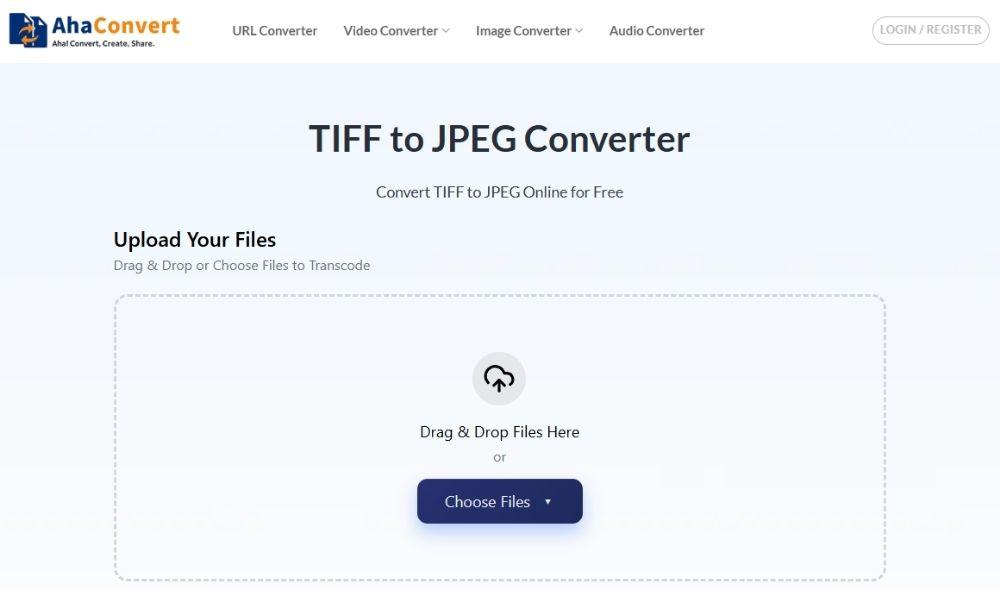
To get started, open your preferred browser and head over to the AhaConvert TIFF to JPEG Converter website.
Step 2: Upload TIFF File
Once you are on the TIFF to JPEG Converter page, upload your TIFF file. AhaConvert gives you multiple options to do this. You can simply drag and drop the TIFF file into the upload area, or click on the “Upload Files” button to choose other options, such as uploading from your computer or pasting a file URL.

Note: AhaConvert also supports batch conversion, so if you want to convert two or more TIFF files to JPEG, you can do that by either uploading an entire folder of TIFF media or adding them individually, and AhaConvert will automatically convert them one by one.
Step 3: Start TIFF to JPEG Conversion
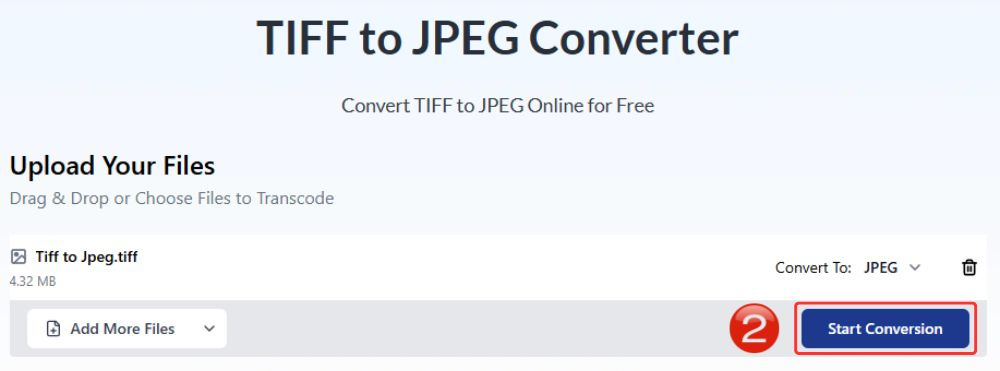
After uploading the file, click on the “Start Conversion” button to begin the process. You do not need to adjust the output format, as it is already set to “JPEG” in the “Convert to” field.
Step 4: TIFF to JPEG Conversion Process
AhaConvert will show the progress of your conversion in real time. This usually takes a few seconds, but it can take longer depending on the file size and how many TIFF files you are converting.

Step 5: Download the JPEG image
Once the conversion is complete, the download option will appear on the right. Click on the “Download” button to save the JPEG image to your computer.

FAQs About TIFF vs JPEG
a. Is TIFF better than JPEG?
Not in most cases, JPEG is lighter in weight, compatible with most devices and browsers, and is easily transferable at the expense of lower image quality. TIFFs tend to have better image quality. So, TIFF vs JPEG both excel in different departments, so depending on your criteria, you should choose the one that best fits your needs.
b. Is it safe to use a TIFF to JPEG converter?
The conversions between TIFF vs JPEG on AhaConvert are relatively safe. AhaConvert stores uploaded files with 256-bit SSL encryption and deletes them within 24 hours so your privacy remains secure.
c. Does converting TIFF to JPEG lose quality?
Theoretically, yes. JPEG works on a lossy file format, which means data that normally goes unnoticed will be deleted from the files, and the file size will be reduced. If you’re using a good converter, such as AhaConvert, the difference won’t be as noticeable.
d. Can all devices open TIFF files?
Not necessarily. TIFF is most definitely supported by Adobe; however, many basic apps, browsers, and mobile devices will likely show an error if you try to open them
e. When should I use TIFF instead of JPEG?
Between TIFF vs JPEG, when you can not compromise on the image quality in the slightest, it’s best to go for TIFF rather than JPEG. This usually necessitates professional photography, printing, archiving, or editing work where you do not want to lose any image data.
f. TIFF vs JPEG: Who is better for long-term storage?
TIFF is generally better for long-term storage because it preserves image quality without loss. JPEG compresses data, which means some quality is permanently removed.
AhaConvert for Best TIFF to JPEG Conversions
Once you convert TIFF to JPEG, you may notice a slight difference in the quality. In theory, it makes sense. But the good news is you can avoid it. TIFF vs JPEG conversions are tricky because image data is lost, but AhaConvert preserves colors far more accurately than most tools, while balancing compression so visuals remain at their highest quality.
