
If you work with high-resolution images, scanned pictures, or publishing files, then it would be difficult for you to share the files, store images, and print. TIFF files have excellent image quality, flexibility, and reliability. But their limited compatibility and large size make them inconvenient for everyday use, and this is where you need to convert TIFF to PDF.
PDFs are widely compatible as they can be opened by most devices and software. They are secured because they have the option of encryption and password protection. This article will guide you on TIFF, PDF, why to convert TIFF to PDF, and how to convert TIFF to PDF.

What is TIFF Format?
TIFF stands for Tagged Image File Format. This format is used to store high-resolution images or scanned documents. It supports lossless compression, which helps in maintaining image detail. This format handles multiple image layers and color depths up to 32 bits. It also stores scanned documents without losing the image quality.
What is PDF Format?
PDF stands for Portable Document Format. This format is designed to open documents on most devices. It maintains document formatting, fonts, and images. They also provide security options of encryption, passwords, and digital signatures. PDFs are widely used for sharing, archiving, and preserving documents.
Why Convert TIFF to PDF?
TIFF stands for high-quality image storage, and that is why it is ideal for editing. It has limited compatibility as not all software, web browsers, and devices handle this file smoothly. PDF is designed for document sharing and archiving, and its quality depends on conversion settings. They work on almost every device, open in most browsers, and are easy to share.
PDF is a suitable option for sharing, printing, and archiving. A PDF file is supported on different operating systems, browsers, and software. This universality eliminates the compatibility issues. It combines the text, images, and vector graphics in a single compact file, which has a smaller size compared to the TIFF images.
In printing, PDF preserves the page layouts, margins, and fonts, ensuring that the print is the same as it is on the screen. PDFs can be archived for a long time as they are widely used and unlikely to become obsolete. The searchable feature of PDFs makes it easy to find the specific documents in the archives.
You don’t need to convert a TIFF image to PDF when you have to move a captured image to document management or distribution. TIFF files are bulky and inconvenient for emailing. Converting PDF makes the document lighter, easier to open, and universally accessible.
The Best Free TIFF to PDF Converter Online
There are numerous apps and online tools available that convert TIFF to PDF. AhaConvert is one of the TIFF to PDF converters that allow users to convert files such as images, videos, audio, docs, etc. between over 300 formats.
You don’t need to download the software or create an account. Just open AhaConvert in your browser, upload your file, and convert it. AhaConvert converts files quickly. In addition to this, it also provides security as files are automatically deleted after use. You can use it on any device with a browser. It works on a desktop, tablet, or phone.
How to Convert TIFF to PDF(Step-by-Step)
The process of converting a TIFF to PDF is very simple. To learn how to convert TIFF to PDF using AhaConvert, follow these simple steps:
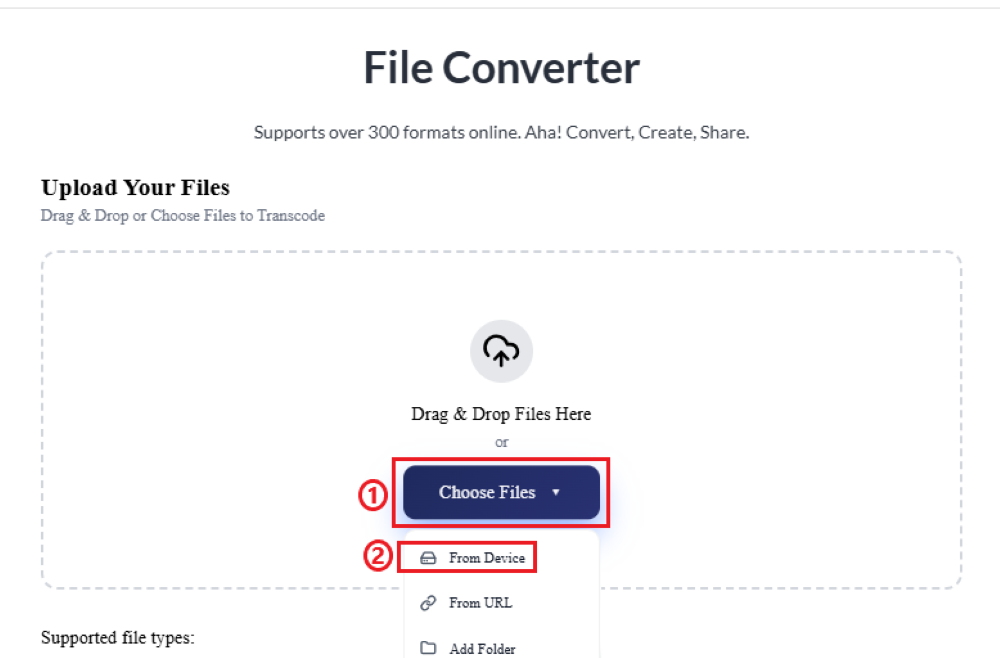
Step 1: Upload Your TIFF Files
Open AhaConvert TIFF to PDF Converter in your web browser. Click on the “Choose Files”. You can select the image using one of the following methods: upload it from your device, drag and drop the image, or provide the image URL. Choose the option that works best for you.
Step 2: Select the Output Format
Click on “Select format”. You will see options for different formats. To convert TIFF to PDF, select the format as “Document” and then “PDF”.

Step 3: Convert the TIFF Image to PDF
Press the “Start Conversion” button and then wait for a few seconds.

Step 4: Download PDF
Finally, click “Download” to download the converted PDF file.

This is a simple and quick four-step process. AhaConvert makes it easy to convert TIFF to PDF. The TIFF to PDF converter works online, so there is no need to download or install the software. It is a valid and reliable solution to convert TIFF to PDF. You can select a single file or multiple files at a time, depending on your needs. AhaConvert automatically processes the file and converts it.
FAQS about Converting TIFF to PDF
1. Can I convert multiple TIFF images into one PDF?
You can easily convert multiple TIFF images into one PDF. One of the reliable platforms that is available online for free is AhaConvert. AhaConvert is a TIFF to PDF converter that has a batch conversion feature that allows users to upload and convert multiple files at once.
2. Is it Safe to convert TIFF to PDF online?
If you want to protect your TIFF files, then you should pick the converter that guarantees a secure file conversion. AhaConvert fully protects users’ privacy. It encrypts your files during conversion and automatically deletes them within 24 hours.
3. Do I need to install any software to convert TIFF to PDF?
You can convert TIFF to PDF without downloading anything. There are many online converters like AhaConvert. All you need to do is open the browser and look for a TIFF to PDF converter that is available online for free, for example, AhaConvert. Open the converter, upload the TIFF file, and get the PDF.
4. Can I convert TIFF to PDF on mobile devices?
You can easily convert TIFF to PDF on mobile devices. AhaConvert has made this process very easy as it is optimized for mobile use. They work smoothly on both Android and iPhone browsers. Their simple interface works well on smaller screens. This makes mobile conversions fast, secure, and reliable.
5. What is the maximum TIFF file size I can upload?
It depends on the converter you are using. Modern online converters like AhaConvert have optimized and efficient processing. They allow users to upload large, high-resolution TIFF files and convert them without compromising the quality. For the exact size limit, check the tool’s upload guidelines.
Conclusion
TIFF files provide high image quality. They are used for professional photography, graphic design, and printing. Because of their large size and incompatibility, users need to convert TIFF to PDF. PDFs are smaller in size compared to TIFF format. They are universally supported and open on almost all devices. There are many platforms available online to convert TIFF to PDF. Choosing the one that offers all the features is essential, for example, easy to use, protects privacy, supports batch conversion, and is free of cost.
AhaConvert TIFF to PDF converter fits this criterion. They offer features like easy interface, batch processing, and strong privacy protection, all for free. It makes the conversion process smooth for the users who want both quality and ease of use in 2026.
