

Digital images are all over the internet, ranging from images used to display banners for certain websites to images people share on social media. However, not all images are used for the same purpose. There are many different formats for images. Two of the most common are JPG and GIF images, but when we have to decide which one to consider, we have to decide that on that on the basis of image quality, colors, and also the size of the file, whether or not each can be animated.
A JPG image can be used to display images such as photographs. The JPG image can display millions of colors while also being kept small in size. A GIF image can be used to display images such as simple animations or graphics. Sometimes we want to convert GIF into JPG images and also JPG into GIF, so in this article, we will learn how to perform this conversion using online conversion tools.
What Is JPG?
JPG stands for Joint Photographic Experts Group. This is the group that developed the JPG type of images. This is one of the most commonly used types of images on the internet. This is particularly best for photographs.
The JPG type of image has a special type of compression that minimizes the space it occupies on the internet. This is particularly good because it doesn’t compromise the quality of the image. This is the main reason why the JPG type is the most commonly used on the internet.
All cameras, as well as smartphones and image editing software use the JPG type as a default. This is the main reason why the JPG type has become the standard for photographs.
Key Characteristics of JPG
The features that make JPG suitable for photographs are given below:
• Can display up to 16 million colors
• Uses lossy compression
• Can be displayed on almost all devices
• Suitable for complex images like photographs
However, it does not support transparency or animations. Therefore, it is not the best option for designers who want to add these features to their images.
Common Use Cases for JPG
JPG is a commonly encountered file type in various digital media. The compressibility of the format makes it a suitable choice for the sharing of images.
Some of the most common applications of the JPG format include:
• Images for websites
• Images for blogs
• Social media
• Photography
• Images for online stores
The use of the JPG format is significant as it allows for the faster loading of websites due to the smaller size of the images.
What is a GIF?
GIF stands for Graphics Interchange Format. This format was developed in the late 1980s. It was used for simple images which were mostly used for the internet.
One of the major differences between these two formats is the inclusion of animation. These animation options allow the user more than one frame in a single image, which can move continuously.
One of the major differences is that the GIF format only accommodates 256 colors, whereas JPG supports a wide range of colors and this makes the JPG format display images in better quality.
Key Characteristics of GIF
The following features that distinguish GIF from other image file formats are:
• It supports animations and looping images
• It is a lossless image file format
• It allows transparent backgrounds
• It has a limitation of only 256 colors
Therefore, GIF is best used for simple images rather than photographic images.
Common Use Cases for GIF
GIF files are commonly used in situations where animation or simple visuals are required. Typical examples include:
• Animated social media posts
• Memes and reaction images
• Website icons and small graphics
• Tutorial demonstrations

JPG vs GIF: Key Differences
By understanding these differences, we may easily decide which format is better to use for a particular purpose. Some of the major differences between these two formats are stated in the following paragraphs:
Image Quality
JPG format has the ability to support millions of colors, which is why it is suitable for images like photographs. GIF format has the ability to support only 256 colors, which is why it is difficult to display images with good quality.
File Size
JPG format has a smaller file size compared to GIF format. GIF format has a larger size, especially if the images are animated.
Color Support
JPG format has the ability to support a wide range of colors, whereas GIF has the ability to support fewer colors.
Animation Support
GIF format has the ability to support animation, whereas JPG does not support animations
When Should You Convert GIF to JPG?
Many people require the conversion of GIF to JPG for different purposes because GIF images contain unnecessary frames and limited colors, which increases the size of the file.
Using a GIF to JPG converter can simplify images and improve compatibility with websites or documents.
You may want to convert GIF to JPG when:
• You need a smaller image file size
• The animation in the GIF is not necessary
• The image will be used in documents or presentations
• You want better compatibility with editing software
In many cases JPG files are easier to manage and share across different platforms.
So, now we know the reasons why you might want to convert GIF to JPG. Let’s move on to the good stuff and how this process takes place. These tools make the process as simple as uploading your image, selecting the GIF which we want to convert and we are done. The best part is that most of these tools are totally free, without any need for registration. Whether you’re looking to optimize your website or simply want to convert your GIFs for social media, these tools have everything you need. And they are very much user-friendly. Let’s give them a try!
How to Convert GIF to JPG Online
Before starting the conversion process, it helps to understand why online tools are useful.
Why Use an Online GIF to JPG Converter?
Online converters allow users to change file formats without installing software. Tools like AhaConvert make the process simple and accessible.
With its browser-based system, users can convert files directly from their devices while keeping the process fast and secure.
You can try the GIF to JPG converter here:
https://ahaconvert.com/gif-to-jpg/
Step 1: Upload your files
Visit the Ahaconvert’s page. Click the upload button and select the GIF file from your computer or mobile device that you want to convert. Or drag & drop the GIF files to the box.

Step 2: Select the output format
After uploading, select the converted format as JPG.
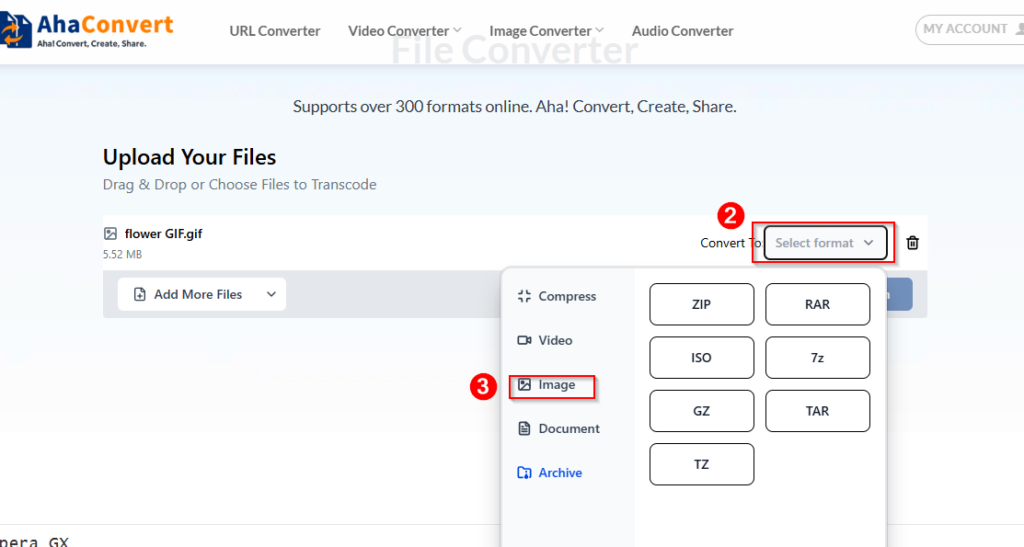
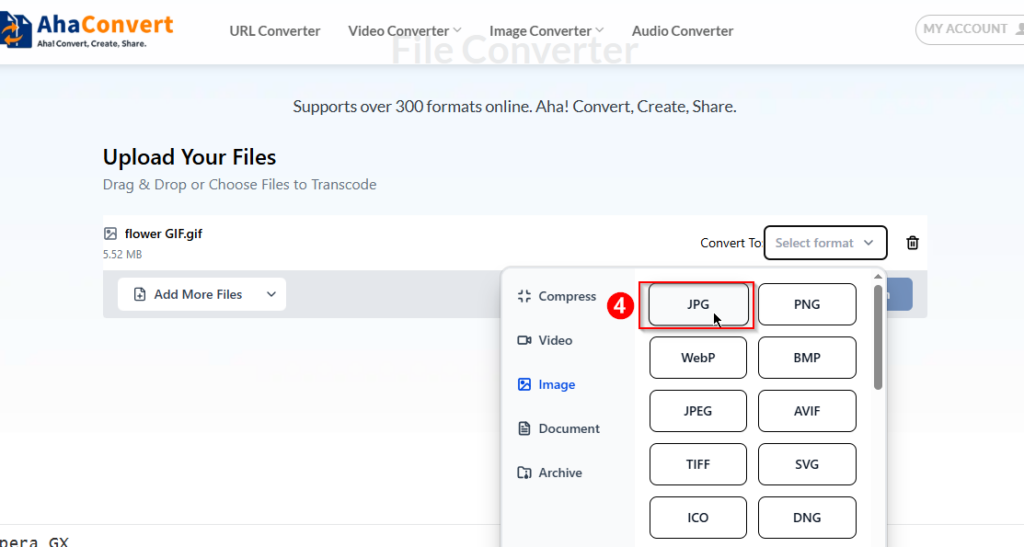
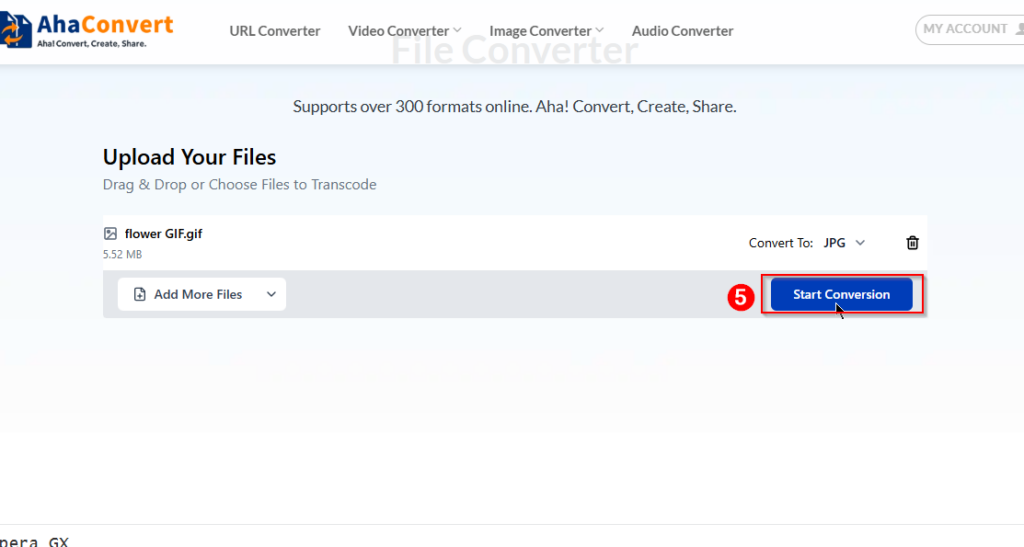
After uploading the file, click on the conversion button. Then it will automatically process the image and convert the GIF into JPG format.
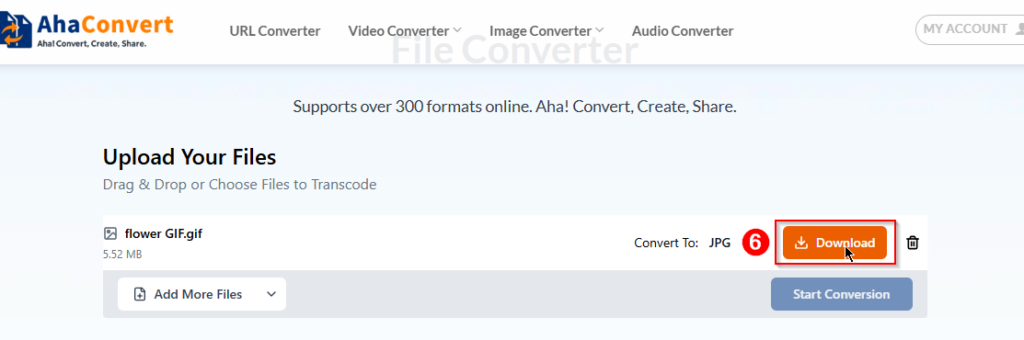
Step 4: Download the JPG File
Once the conversion finishes, we can easily download the JPG image directly to our device.
Because AhaConvert supports more than 300 formats and batch conversion, users can convert multiple files quickly without installing additional software.
Frequently Asked Questions
1. Can I convert GIF to JPG for free?
Yes. There are many free tools for converting GIF to JPG. For example, AhaConvert offers a free GIF to JPG converter that can be used directly in your web browser.
2. Can I convert an animated GIF to JPG?
Yes. But only the frame of the animation will be downloaded as a JPG because JPG does not support animations.
3. Can I convert GIF to JPG on my phone?
Yes. Online GIF to JPG converters can be simply used on smartphones as well as tablets. Simply open the GIF to JPG converter website on your phone, upload your GIF file, and then download your JPG file.
4. Is it safe to use an online GIF to JPG converter?
Yes. It is completely safe to use as it ensures the user’s safety, and they offer secure upload and automatic deletion of your files. For example, AhaConvert securely stores your uploaded files but deletes them immediately after conversion.
5. Why is JPG better than GIF for images?
JPG can handle millions of colors and offers better quality of images. On the other hand, GIF can only support 256 colors and cannot display clear images.
Conclusion
JPG can be used for good quality images and pictures because it supports a larger quantity of colors and file sizes. As far as GIF is concerned, it doesn’t allow a variety of colors, but it supports animations
But in some cases, especially when we do not need our images to be animated, user can decide if they want to convert their images from GIF to JPG. A good GIF to JPG converter, such as AhaConvert can help a user do this in a quick and efficient manner.
Converting a GIF to JPG can be really helpful when you have an image that doesn’t need animation. JPGs are great for photos because they can display millions of colors without ruining the quality of the image, and are usually smaller in size which you completely understand now. Other than that, this simple conversion can make a huge difference in image management tasks, making them perfect for sharing online or using on websites. It’s an easy fix that makes your Images look sharp and saves space.
