
Being one of the earliest file formats to really blow up online, GIF somehow survived every trend cycle thrown at it. Memes changed, platforms changed, but GIFs never really left.
The problem starts when you actually need to use them somewhere serious. For example, a report, presentation, or official submission. GIF isn’t the most compatible file format out there, and so people usually end up needing to convert GIF to PDF.
Finding a good GIF to PDF converter is half the battle because some tools butcher the frames while others bury the converter under ten layers of ads.
So today, instead of wasting time hopping between random tools, you will see which converters actually deliver, how fast they work, and what kind of output you can realistically expect once you convert GIF to PDF.
GIF VS PDF: Key Differences

GIF is a raster image format mostly known for animated visuals, though static GIFs exist too. The animation works through looping, where multiple images or frames are played one after another, so it appears animated.
That works great for memes, reactions, and quick visuals, but PDFs do not support that kind of animation. So when you convert a GIF to PDF, the output usually becomes either one static frame from the GIF or multiple frames arranged inside a single PDF file.
The table below gives you a no-nonsense summary of the differences between the two. Understanding how both formats work helps explain why the conversion process behaves so differently depending on the file and converter you use.
| SVG | JPEG | |
|---|---|---|
| File Extension | .svg | .jpg, .jpeg |
| Type | Vector format | Raster format (pixel-based) |
| Image Structure | Mathematical shapes and paths | Pixels (grid of colors) |
| Scalability | Infinite (no quality loss) | Limited (pixelates when enlarged) |
| Compression | Lossless | Lossy (reduces quality to save space) |
| Transparency | Supported | Not supported |
| Animation | Supported (CSS, JavaScript) | Not supported |
| Editing Tools | Editable in code editors & vector tools (e.g., Illustrator) | Editable in image editors (e.g., Photoshop) |
| Web Compatibility | Supported by all modern browsers | Supported by all browsers |
| Software Support | Works in browsers, design tools, and code editors | Works in all image viewers and editors |
| Best Use Cases | Logos, icons, UI elements, illustrations | Photographs, realistic images |
| File Size | Small (for simple graphics) | Medium to large (depends on quality) |
Why Convert GIF to PDF?
As established, GIFs can animate while PDFs cannot. So it may not make much sense at first why anyone would want to convert an animated image into a static file or multiple still images.
Unlike JPG vs GIF discussions, where the comparison is mostly about image quality and compression, GIF to PDF is more about compatibility and document use. And in many cases, you may not even have another option than to convert GIF to PDF.
Easy sharing: In many cases, especially while emailing or messaging, GIFs do not display properly across all devices, apps, or operating systems. You have to convert GIF to PDF to make the file easier to open and share.
Requirement: Sometimes you are simply asked to submit a report, presentation, or even an image in PDF format. This can happen at school, university, or the workplace. If the file you currently have is a GIF, then there is not much way around it but to convert GIF to PDF.
Printing: You obviously cannot print an animated GIF as an animation. When you convert GIF to PDF, it gives you either one static frame to print or multiple frames placed inside the document like a step-by-step sequence.
Combining with other files: PDFs can hold multiple pages, screenshots, images, notes, and text in one place. So if you want to include a GIF inside a report, guide, presentation, or documentation file, you must convert GIF to PDF.
Annotation and review: PDFs are much easier to mark up. You can add comments, highlights, notes, labels, or instructions directly onto the file. That becomes useful when the GIF is being used for feedback, explanations, or documentation.
Security: GIFs are easy to copy, forward, or reuse, which may not be ideal if the file contains important information. Saving the image inside a PDF gives you more control over how the file is shared. PDFs also support extra protection features like password protection, which can help keep the file safer.
Online GIF to PDF Converters
Whatever the reason you want to convert GIF to PDF may be, you need to be clear about how you want the final PDF to look. Some converters may decide on their own whether to turn an animated GIF into multiple still frames or use only one static image from the GIF.
These reliable online converters give trusted results, and here is more on what they offer, and the kind of output they deliver when you convert GIF to PDF through them.
AhaConvert GIF to PDF Converter

For an online converter that you can rely on to deliver results quickly and efficiently, while still working the way you expect and keeping your documents secure, AhaConvert GIF to PDF converter is a great online converter to consider. Among the top online GIF to PDF converters, this one by far had the easiest interface. All you really have to do is upload your GIF file, and wait for a short while as the tool convert GIF to PDF.
Now, there is no proper batch conversion option, but you can still add multiple files one after another, and it will convert them individually, depending on how heavy the file is. Downloading the final PDF is equally simple.
You also know an online converter takes security seriously when it uses 256-bit SSL encryption and deletes uploaded files within 24 hours.
i2PDF GIF to PDF Converter

i2PDF has one of the older-looking interfaces out there, and spoiler alert, the output is actually quite good. The tricky part is finding your way around the site. You usually have to click through a few buttons before finally landing on the actual GIF to PDF converter, and a lot of that confusion comes from the massive ads placed right in the middle of the interface.
But once you get past that, the rest of the process is quite pleasant. One good thing is that you get a preview of what the output will look like and how many pages the conversion will generate before downloading the file.
You can also add multiple GIF files in one go and choose how you want the final PDF arranged. It even lets you download specific pages only, whether that is even-numbered pages, odd-numbered pages, deleted pages, or rotated pages, depending on what you need.
Convertio GIF to PDF Converter

Convertio is a well-known online converter, and if you have not heard of it yet, it is probably because you have not dealt with file conversions that often. It is one of the more established names in the space and even claims that several recognized companies use its services.
Because the platform relies heavily on its paid model, the overall experience feels dependable and properly maintained. In terms of security, it uses TLS encryption along with HSTS web security policies to help make sure your data stays protected. This is followed by the usual practice of deleting uploaded files after 24 hours.
The actual conversion results are quite consistent with AhaConvert since both use reliable conversion engines behind the scenes. The main difference is that Convertio pushes its premium plans more aggressively. Pricing starts at around $9 if you want unlimited conversions and fewer restrictions.
OnlineConvert GIF to PDF Converter
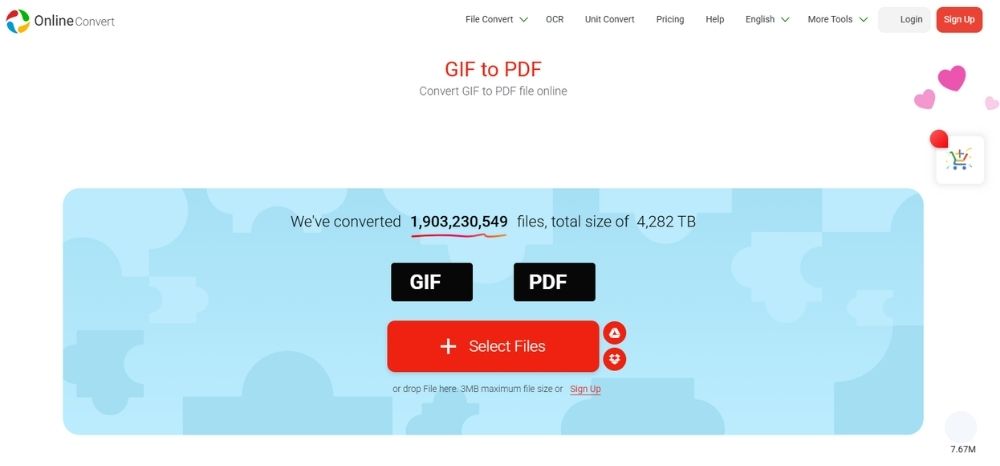
OnlineConvert, our last converter in today’s discussion, is all about quick and easy conversions. The GIF to PDF process is about as simple as it gets. Upload the file, select the output format, wait a few seconds, and download the result. There is no proper preview feature, but the output is generally good enough for most users.
The only thing that may bother privacy-focused users is that the platform does not clearly mention what type of encryption it uses. Still, its detailed privacy policy repeatedly assures users that uploaded documents are not tampered with.
So if fast and simple conversion matters more to you than advanced controls, OnlineConvert is still a reliable ption to go with.
How to Convert GIF to PDF?
A reliable GIF to PDF converter should make sure the final output actually looks good, with clear image resolution, proper page fitting, and secure file handling throughout the process. AhaConvert is a great option to consider for that, and here is how you can convert GIF to PDF using it.
Step 1: Open AhaConvert GIF to PDF Converter
Open the AhaConvert GIF to PDF converter through your browser.
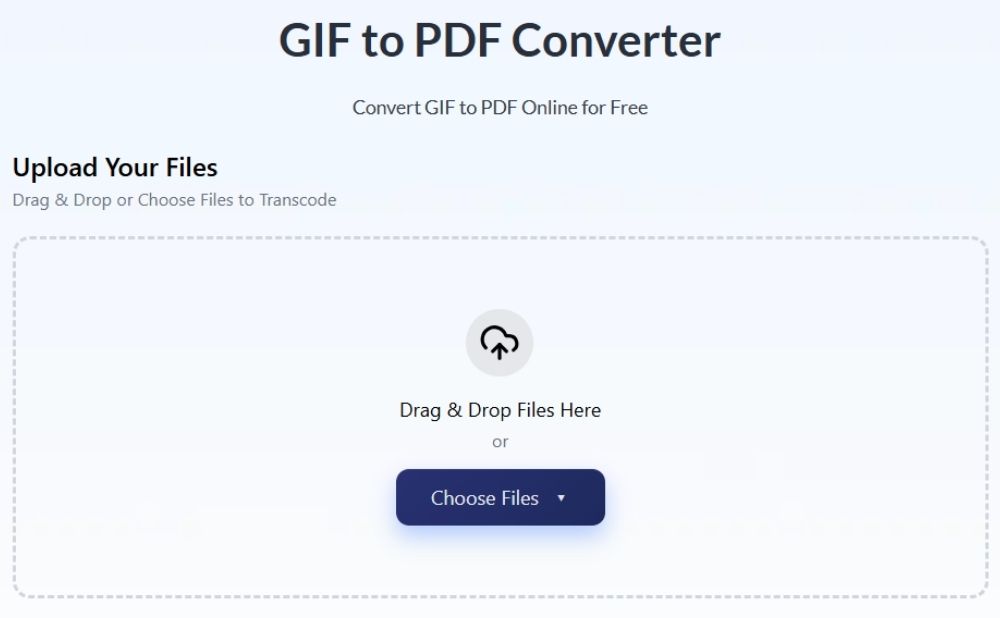
Step 2: Upload your GIF file
Click Choose Files, then select From Device to upload your GIF file from your drive. You can also drag and drop the file directly onto the upload area.
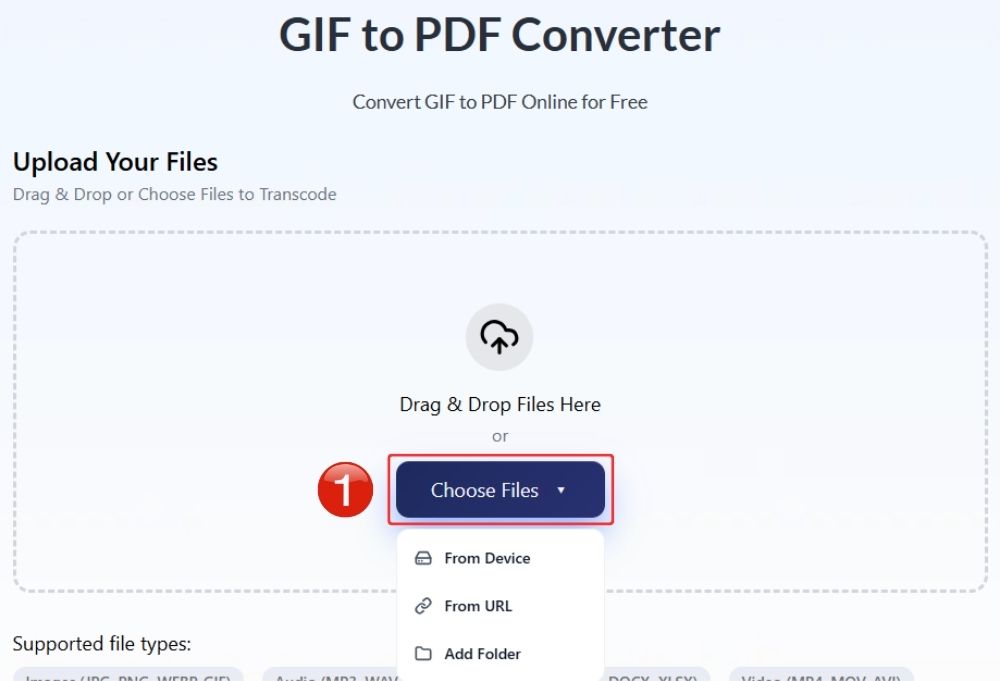
Step 3: Start the conversion
Click the Start Conversion button to convert the GIF file to PDF. All the files you selected will start converting one by one.
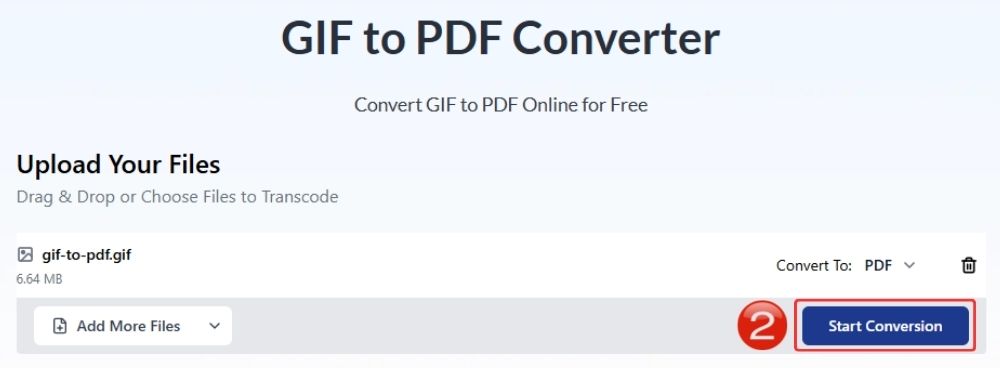
Step 4: Wait for Conversion
The conversion is normally quite fast; it normally takes a couple of seconds to convert GIF to PDF.

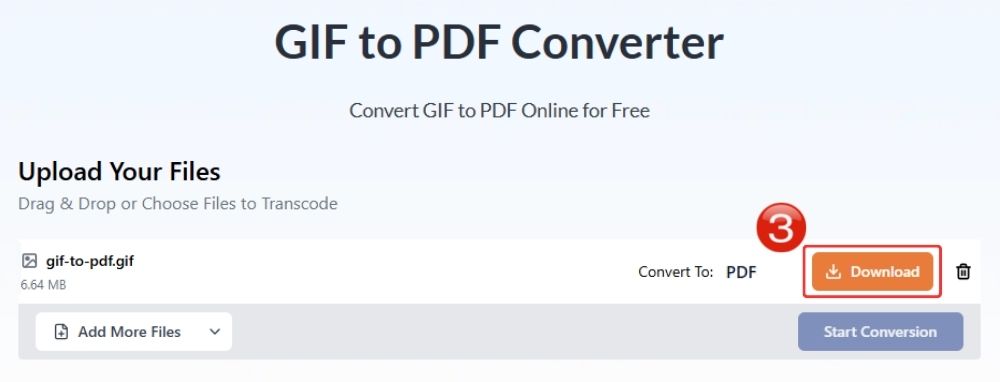
Step 5: Download the PDF file
Once the process is complete, click Download to save the converted PDF file to your device.
Frequently Asked Questions
a. Can I convert GIF to PDF for free?
Yes, several online free tools can convert GIF to PDF free of cost. Some great tools are AhaConvert, Convertio, and OnlineConvert.
b. Will animation remain in the PDF?
No, PDF does support looping animation, and instead with either extract one single frame from the GIF and save it as a static image inside the PDF or split the GIF into multiple frames and place them across one or more PDF pages.
c. Can I combine multiple GIFs into one PDF?
Yes, many GIF to PDF converters let you combine multiple GIF files into a single PDF. Some tools place each GIF on separate pages, while others may split animated GIFs into multiple frames across the document.
d. Is online GIF to PDF conversion safe?
It depends on the converter you use. Reliable converters usually use SSL or TLS encryption and automatically delete uploaded files after a few hours.
f. Does the converter work on mobile devices?
Yes, most modern GIF to PDF converters work on mobile devices through a browser. You can upload files directly from your phone, convert them online, and download the PDF without installing extra software.
Wrapping Up
At the end of the day, most people just want to convert GIF to PDF through a process as easy as cutting a cake. And thankfully, a few tools still get the job done properly.
All the converters discussed here are capable options, but AhaConvert GIF to PDF converter especially stands out for keeping things simple. It gives that rare mix of ease of use, clean output, and a sense of security while converting files. You upload the GIF, select PDF, hit convert, and you are pretty much done without the whole process turning into a scavenger hunt.
