
Did you know that CR2 files occupy much more space than JPG files and take longer to transfer to different storage devices? There are many more reasons to convert CR2 files to JPG. With a reliable CR2 to JPG converter, it’ll take you a few minutes to convert hundreds of files without distorting the image quality.
While there are many tools you can use to convert CR2 to JPG, today we will show you the easiest way to convert CR2 pictures to JPG online for free.
What is CR2 File Format?
CR2 file (Canon Raw 2) as a raw photo captured by a digital Canon camera. CR2 file format refers to the structure and organization of data in a CR2 file. This format stores uncompressed, high-quality, and original data. The CR2 file format extension’s abbreviation is .cr2.
Canon Inc. is the company behind Canon cameras, and the CR2 file format is its proprietary format. This is why Canon cameras use the CR2 file.
When you think of professional photographers, think of CR2 files. There are several advantages of using the CR2 file format. They include:
a) CR2 files retain the image’s original high-quality and guarantee maximum quality in high contrast scenes.
b) Images saved in the CR2 file format store uncompressed data. Almost all the information recorded by the Canon camera sensor is saved.
c) They allow for maximum editing flexibility, such as when adjusting exposure.
d) Using software or online apps, you can convert CR2 pictures to JPG and other file formats.
What is JPG File Format?
JPG (also known as JPEG) stands for Joint Photographic Experts Group. JPG file format is an image format that uses compression algorithms to reduce image size without significantly decreasing image quality. The files in this format carry the .jpg extension.
Before the JPF file format was developed, existing file formats, such as TIFF and BMP, prioritized raw data retention over file size. Storying, transmitting, and sharing these images was a challenge.
After the JPG format solved these challenges, it became the preferred choice for many photographers, web designers, and graphic designers. This led to the format’s widespread use.
Why Convert CR2 File Format to JPG?
There’s every reason for you to convert the CR2 file format to JPG. Whether you prioritize speed, compatibility, or space efficiency, the JPG format is the most suitable.
Using the JPG file format for your images offers the following advantages.
i) The JPG file format is more versatile.
Compared with other image file formats, JPG is more versatile. It’s compatible with all the ordinary mobile phone and computer operating systems. These systems include Android, iOS, Linux, Microsoft Windows, and MacOS.
ii) JPG file format offers smaller file sizes.
If you want your images to accupy small space, consider shooting them in JPG format. Imagine this: while a typical JPG photo weighs between 200KB and 400KB, a CR2 photo weighs between 20MB and 65 MB. You’ll therefore save a lot of memory on your device by storing files in JPG format.
iii) Faster to transfer to other storage devices and share on social media.
Because JPG files are lightweight, transferring them using Bluetooth and other file-sharing apps is fast. Equally, sharing the files in bulk on social media takes a few seconds.
iv) Printing convenience.
Because printing CR2 files uses large amounts of data and is slow, printing services prefer JPG files. Converting CR2 to JPG saves data and prints faster.
How to Convert CR2 to JPG?
An Online CR2 to JPG Converter – AhaConvert
Whether you use software or an app, it’s easy to convert CR2 to JPG. But because CR2 isn’t compatible with many image converters, we recommend using AhaConvert. This is a free online CR2-to-JPG converter. You don’t have to register or download the app to use AhaConvert.
Whichever operating system or device you use, just open this image, audio, video, and document converter, and you’ll convert your files to over 300 different file formats.
Here are the reasons you might want to consider choosing AhaConvert:
i) Batch conversion – When converting file format, AhaConvert allows you to upload and convert multiple files.
ii) Easy-to-use interface – The app’s intuitive user interface is easy to understand, navigate, and operate. Whether a beginner or an expert, you’ll find it easy to use.
iii) Supports a wide variety of file formats – Using this CR2 to JPG converter, you can convert audio, video, image, and documents. It also supports over 300 different file formats.
iv) Free to use – Unlike many other paid file converters, there’s no subscription fee required before using this tool.
Step 1:Go to AhaConvert CR2 to JPG Converter
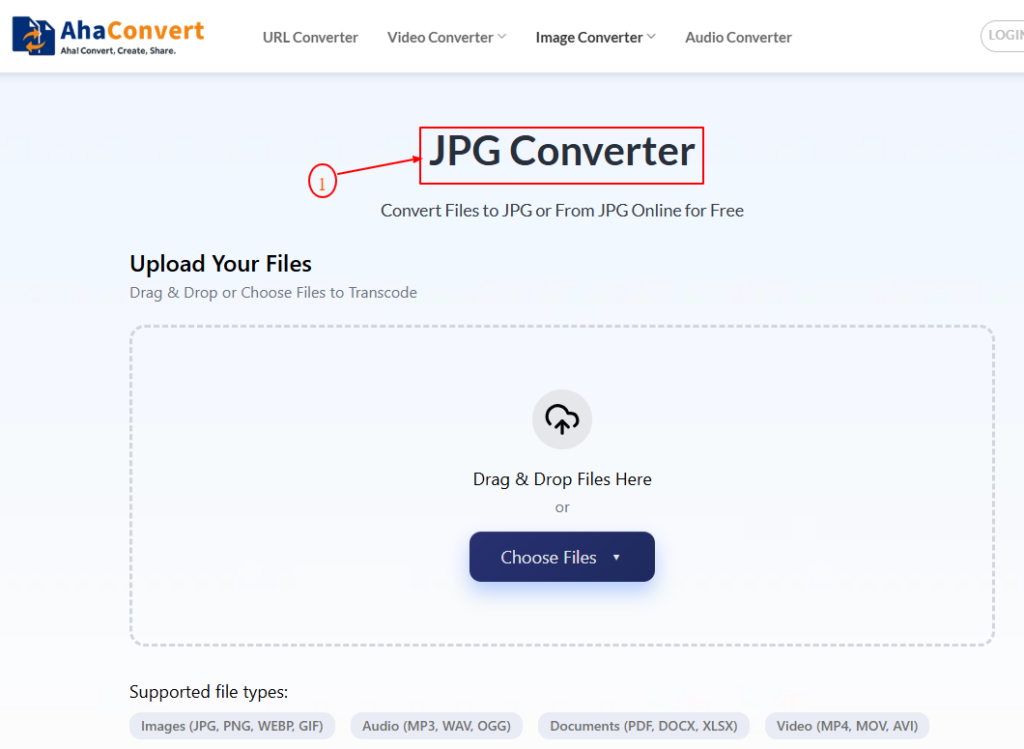
Go to the CR2 to JPG converter on your web browser. Hover your mouse pointer over the “Image Converter” menu and click the “JPG Converter” option.
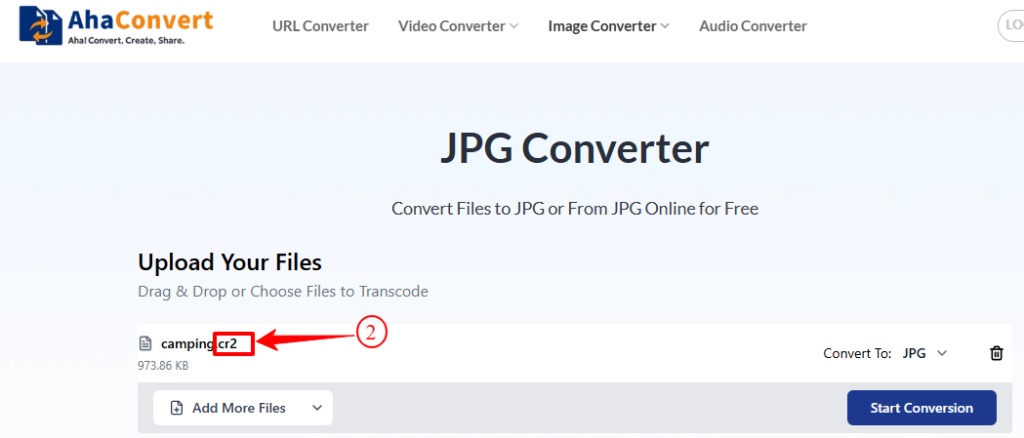
Step 2: Upload Your CR2 Files
Click the “Choose Files” option, then select the location to upload the CR2 file from. If from the “Device” location, click on it and choose the CR2 file to upload to this CR2 to JPG converter. Alternatively, drag and drop files to upload. You can upload multiple files to batch convert.
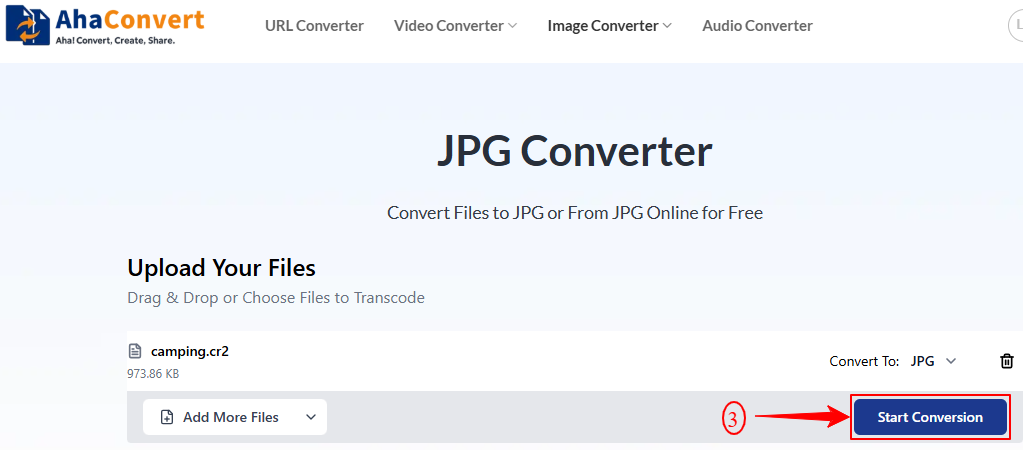
Step 3: Start Converting your CR2 Files
To start converting your CR2 file format to JPG, click on the “Start conversion” button. Whether you’re converting one file or multiple, the conversion process will take a few seconds. Wait for the process to be complete.
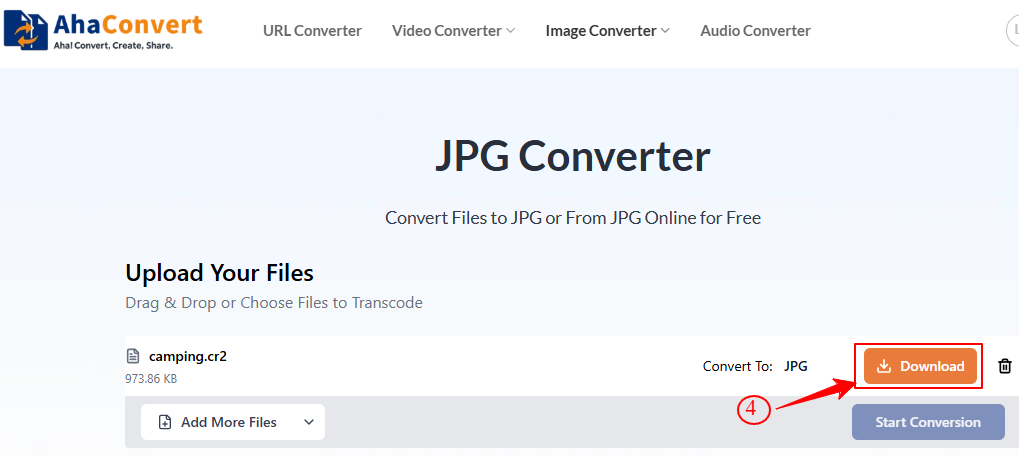
Step 4: Download the Converted Files
Once the conversion is complete, click the “Download” button near the bottom to save your JPEG file to your desired location.
Frequently Asked Questions
a. Are raw photos higher quality than JPG?
Yes, because raw photos contain all the information captured by the camera sensors, they have finer details and higher color depth, and their quality is higher than that of JPGs. Again, unlike JPG photos, raw photos are uncompressed, so there’s no distortion.
b. Is the CR2 to JPG converter free to use?
Yes, the CR2 to JPG converter, AhaConvert, is free to use. No registration, you don’t have to give your credit card details, and no account details are required. And since you don’t download this converter to use, there’s no hassle when converting a file’s format using AhaConvert.
c. Can I convert CR2 to JPG on my phone or tablet?
Yes, using AhaConvert, you can easily convert CR2 to JPG files on your phone or tablet. This file converter works on the browser. So, whether using a phone, tablet, computer, or iPad, use AhaConvert to convert your files to/from over 300 different file formats.
d. Are my CR2 pictures safe when using AhaConvert?
Yes. AhaConvert uses 256-bit encryption for file uploads and conversions to ensure maximum privacy and security for your files. Once you are done with picture conversion, the pictures are automatically deleted within 24 hours. This converter doesn’t share or transfer user details to third parties.
e. What are the disadvantages of RAW files?
Raw files capture all the information from shooting and are therefore large. They occupy a large space and take a longer time to process, print, and even convert. They also require specialized software and apps to edit them. Unlike JPG and other files, their compatibility is limited.
Conclusion
Among the best solutions to the disadvantages of CR2 files mentioned at the beginning of this article include converting them to a more versatile file format, such as JPG. With an easy-to-use CR2-to-JPG converter like AhaConvert, converting CR2 files to JPG makes it easier to share images on social media, edit them, print them, and transfer them to other storage devices.
