
Are you looking for a file converter to convert from PDF to JPG? Do you want to know about a tool that makes this process easy and fast?
PDF and JPG are two commonly used formats. They serve different purposes. PDF is used to preserve documents and their layout. On the other hand, JPGs are mostly used because they are easy to share and upload across different formats. This is why most users look for a free online PDF-to-JPG converter.
In this digital era, it is quite easy to convert a file within seconds. Users need only upload the file, wait a few seconds, and download the required format. Tools like AhaConvert make this process easy, fast, and secure. This guide will show you how to convert a PDF to JPG in seconds.

What are the Differences between PDF and JPG Formats?
There are many differences between PDF and JPG formats, as both serve different purposes. Before you want to convert from PDF to JPG, look at some of the key differences highlighted in the table below.
| Feature | JPG | |
|---|---|---|
| File Type | Document Format | Image Format |
| Purpose | Used for documents, reports, manuals, forms, etc | Used for images, graphics, and visuals |
| File Size | Can be larger in size for heavy documents | Uses compression to reduce the file size |
| Compatibility | Need a PDF reader or a browser | Universally supported across all devices and platforms |
| Best For | Printing and preserving official documents | Sharing and uploading |
Why Convert PDF to JPG?
Converting a PDF to JPG is very useful because JPG images are easy to share, upload, and view on almost all devices and platforms. PDFs require a PDF reader or browser to open. There are many websites, social media platforms, applications, and browsers that do not support PDFs. This limits quick sharing and viewing.
JPGs are smaller due to compression. It makes uploading and sharing faster. JPG formats are compatible as they open on all devices and platforms. In addition, JPG files do not support text editing. It is also safer to use when you want to send content for viewing or reference, not for editing.
There are many tools available online if you want a file to convert from PDF to JPG. One of them is AhaConvert. It is used to convert files between different formats. In this guide, you can learn how to convert a PDF to JPG in a couple of seconds by following easy steps.
A Free Online PDF to JPG Converter – AhaConvert
Numerous tools and apps convert PDF to JPG for free. AhaConvert is not only a free online PDF-to-JPG converter but also supports converting files between over 300 formats. With its easy-to-use interface, it is a good option for students, professionals, and casual users.
It supports batch conversion, so users can convert multiple files at once to save time. This tool is free, and users do not need to download any app or complete a registration process. AhaConvert fully protects users’ privacy. When a user chooses and uploads a file, it is encrypted. After conversion, the files are automatically deleted within 24 hours. These features help users to simply upload a file and convert from PDF to JPG in a couple of seconds.
How to Convert a PDF to JPG Free Online?
Step 1: Select Your PDF File
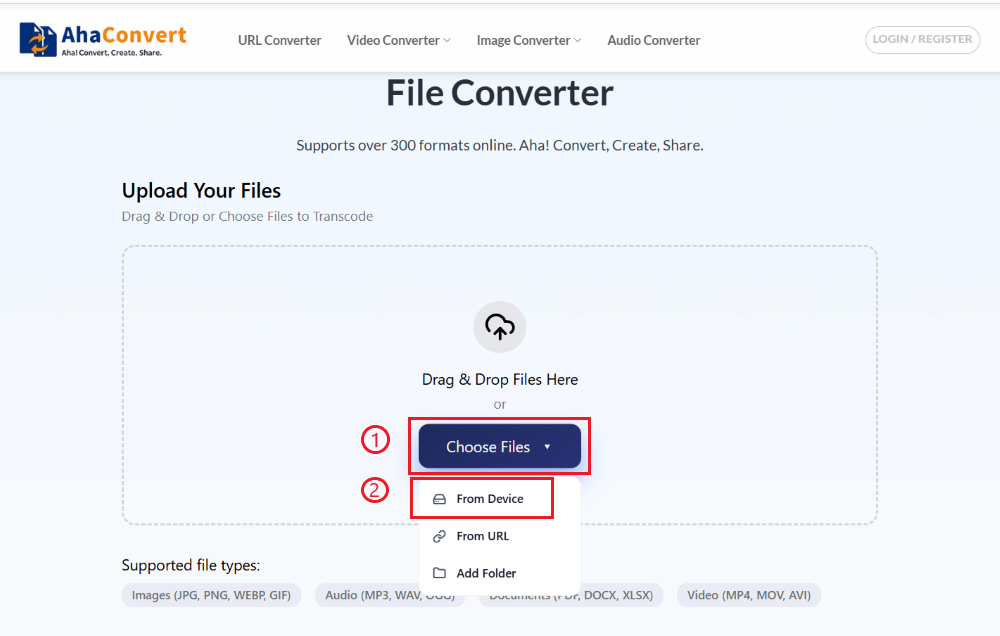
Open AhaConvert, a secure and free online PDF to JPG converter. Click on “Choose Files”. There are three options to select a PDF. You can select a PDF from your device, paste a URL to a PDF, or select a folder.
Step 2: Select the Output Format
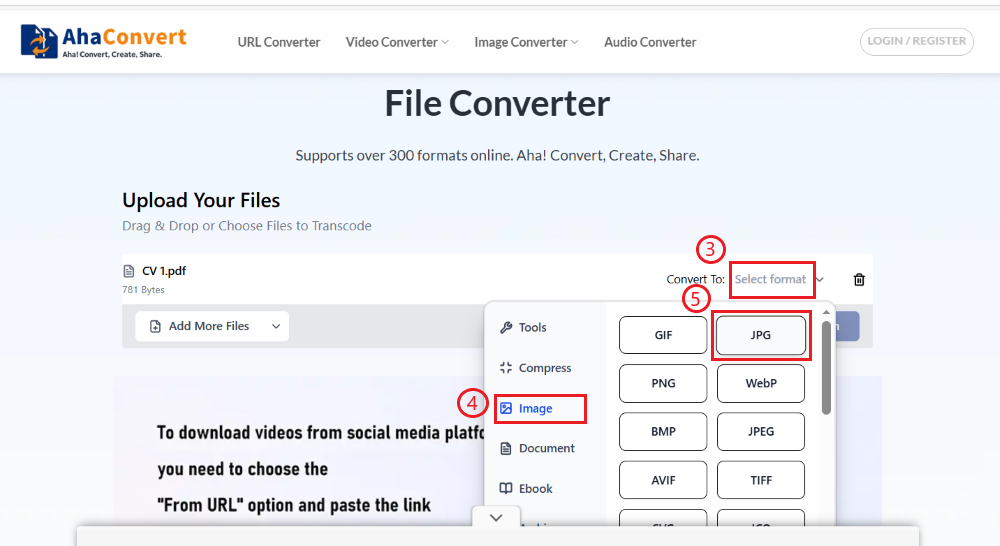
Click on “Select Format”. To convert from PDF to JPG, choose the format as “Image” and then “JPG”.
Step 3: Convert Your PDF File
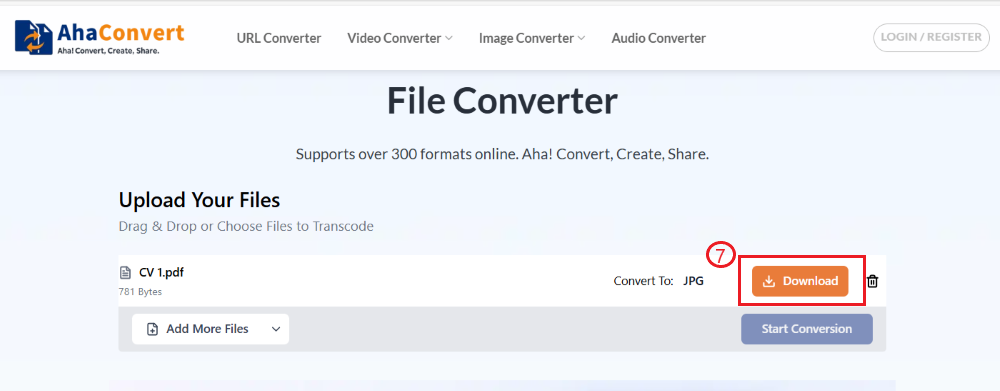
Click the “Start Conversion” button. Wait for a couple of seconds.

Step 4: Download JPG Format
After the conversion process, click on the “Download”. You will get the JPG format.
Frequently Asked Questions
1. Can I convert multiple PDFs at once?
At this moment, AhaConvert does not convert multiple files at once. However, you can save your time by uploading multiple PDFs at a time, and it will convert each PDF individually. The batch conversion feature may be added in the near future.
2. Are my files secure when using this free online converter?
AhaConvert provides fully protected privacy. It prioritizes its users’ privacy and does not share data with third parties. When you upload your files, they are fully encrypted during the process of conversion. After conversion, files are automatically deleted within 24 hours.
3. Can I use the converter on my mobile or tablet?
Yes, you can use AhaConvert on all operating systems and devices. It runs in the web browsers. You can open it on any mobile or tablet. It will work the same way it does on a computer. The tool will resize according to your screen.
4. Can I convert PDFs to other image formats besides JPG?
AhaConvert can convert files between over 300 formats. So, yes. If you use AhaConvert, you can convert PDFs to other image formats besides JPG, like PMG, BMP, DNG, TIFF, etc. Open AhaConvert, upload the PDF, select the required image format, and start the conversion. You will get the desired format within seconds.
5. Does this free online PDF to JPG converter add watermarks to the converted JPG?
No, AhaConvert gives watermark-free output. Despite being free and easily accessible, it does not add a watermark to the converted file. The converted file does not contain any branding, whether you convert a PDF to JPG or any file across any format.
6. Does the converter work with all web browsers?
Yes, AhaConvert runs on all devices. It works with all major browsers, including Google Chrome, Mozilla Firefox, Apple Safari, and Microsoft Edge. There is no need to install any software to use it. You can use this converter on Windows, macOS, iOS, Android, tablets, and other devices with a reliable internet connection.
Conclusion
The JPG format is widely supported and easy to share across devices and platforms. They are easier to share and upload than PDFs because of their smaller size. There are many online tools that can convert a PDF to JPG. You can use AhaConvert for this purpose. It is a free online PDF-to-JPG converter.
AhaConvert can convert files between over 300 formats. To convert from PDF to JPG, upload the PDF and select the JPG format. You can get your desired JPG files with AhaConvert. This tool not only converts PDF to JPG online for free but also supports privacy and time management.
