
Anyone who needs to access an M4A file using older software or certain audio software must have faced compatibility problems before. M4A vs WAV is a popular question when someone is recording voice memos, downloading music files, or working on audio files. The difference between the two files is immense once they are outside of the Apple environment. Knowing how to convert M4A to WAV helps overcome that issue, providing a universally supported audio file that can be used anywhere. This article will discuss in detail what M4A and WAV are, why convert M4A to WAV, and how to do so online, free of charge.
What is the M4A format?
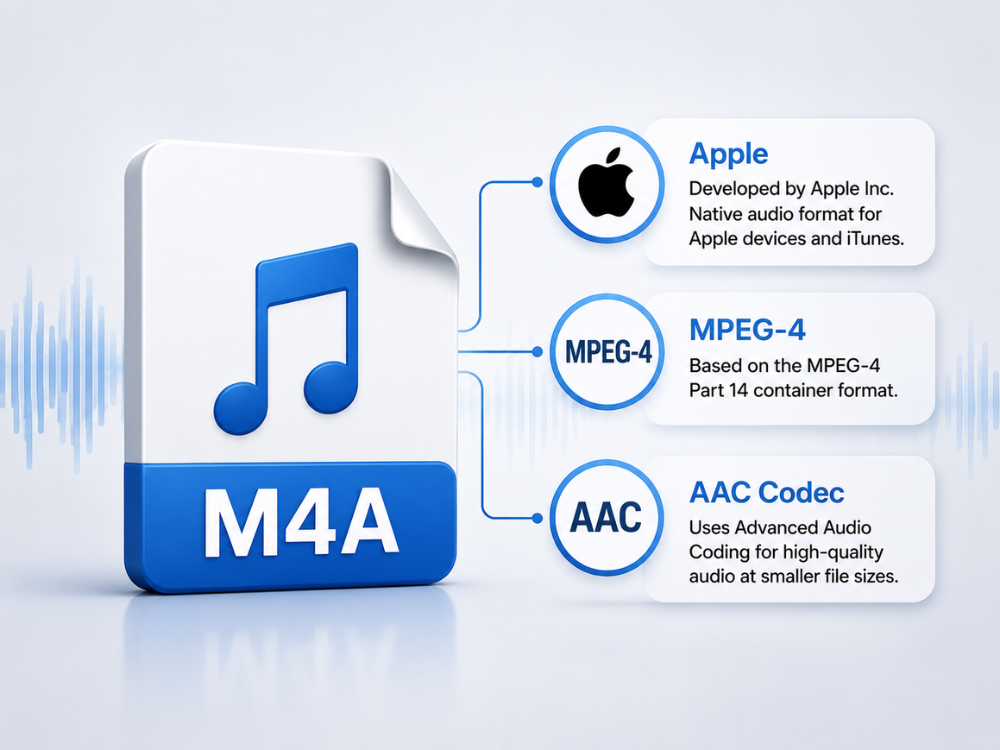
M4A is the abbreviated name for MPEG-4 Audio. This is a file container that mostly contains audio files encoded in the Advanced Audio Coding format. The container can also be used to store lossless audio files from Apple Lossless Audio Codec. The format became popular through its use by Apple as the default audio format used on iTunes downloads and other Apple devices.
This is because the M4A format utilizes lossy compression and uses the AAC codec; hence, these files are quite small in size and have sound quality that is very similar to that of CDs. M4A is therefore suitable for downloading songs and podcasts when storage space is an issue.
The trade-off comes from compatibility, as M4A audio is supported natively by iPhones, iPads, Macs, and other contemporary media players. However, some older software programs and certain digital audio workstations. As well as some devices that either do not have support for the M4A audio format or need an extra codec for that purpose. This is precisely why people search for how to convert M4A to WAV.
However, it’s important to note that some people confuse M4A and AAC, but there is no need, as they are two different things. M4A stands for a container that stores AAC-encoded audio files along with additional information about the song (title, cover, etc.). It does not play any significant role in everyday use, but it seems to be very relevant if you want to know why some programs are unable to open your M4A file. The solution in such a situation will be to convert M4A to WAV.
What is the WAV format?
The WAV file format was invented by Microsoft and IBM way back in 1991. It is an audio file format that uses Pulse Code Modulation to store audio data; hence, there is no loss of audio data while saving a file.
Since WAV does not compress the data, WAV audio files reproduce sound with maximum accuracy. It has been used as a standard for decades now in audio production, broadcast, and post-production. There are no compatibility problems in playing WAV files in any media player, digital audio workstation (DAW), or operating system.
The most obvious drawback is file size. The WAV file format will definitely take up much more space than its M4A counterpart because there’s no compression. For brief audio files such as voice messages, the recording length usually doesn’t matter. But it’s not going to be great for archiving music libraries either.
The straightforwardness of the WAV format is another aspect of what makes it attractive for professional use. It contains metadata in simple chunks that are not as complex as those in other formats, thus providing consistent file structures across various programs. This feature accounts for the enduring popularity of WAV as the universal deliverable in film, broadcast, and gaming audio for all these years, despite the emergence of other competing formats.
And it explains why so many studios request converting M4A to WAV before submitting a project. If you’re considering WAV for high-quality audio storage, you may also want to compare it with FLAC. Our FLAC vs WAV guide explains the key differences in audio quality, file size, and compatibility.
Why Convert M4A to WAV?
Here are some useful reasons why people prefer to change M4A to WAV instead of keeping the original file.
Editing in audio editing software. Most DAWs and audio editors work better with WAV files than with compressed M4A files. It is much safer to convert M4A to WAV before adding it to your project.
Use of older or more specialized software. Many legacy software applications, hardware sample players, and specialized audio software do not have the capability to convert M4A to WAV. Quick Convert M4A to WAV solves this problem right away, and there is no need to look for a codec or plugin.
Preservation of sound through editing. Each time an audio file is encoded into a different format, such as M4A, there is the potential for slight quality degradation. Converting M4A to WAV prior to subsequent editing avoids cumulative degradation.
Meeting delivery or broadcast standards. Most broadcast standards, podcast systems, and audio submission sites need a WAV file format. When your voice memo begins with the M4A format, converting M4A to the WAV format meets this standard without any hassle.
Consistent audio library creation. Some people want all their work audio files in one format because it makes them easier to organize and helps avoid future incompatibility issues. When you know that your audio editing software works best with WAV, then you should convert M4A to WAV on arrival, and do this in just a couple of seconds for each individual file.
M4A vs WAV: What’s the Difference?
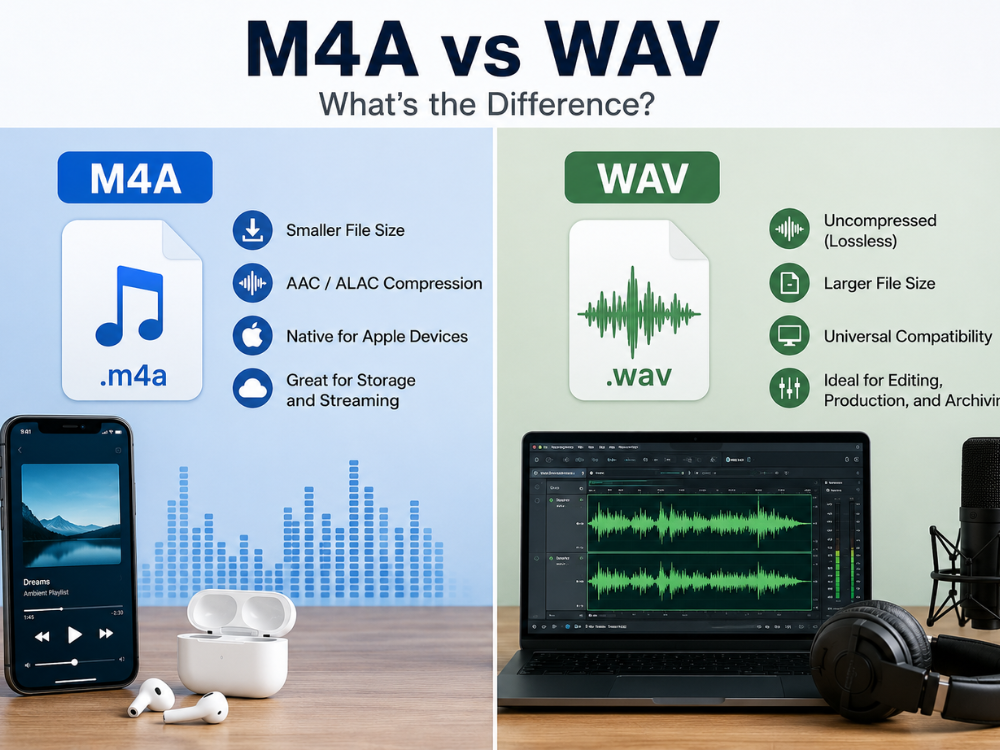
The M4A vs WAV comparison mostly comes down to compression, compatibility, and use case rather than a simple better-or-worse verdict.
| Feature | M4A | WAV |
|---|---|---|
| Developer | Apple (MPEG-4 container) | Microsoft / IBM |
| Compression | Lossy (AAC) or lossless (ALAC) | Uncompressed (lossless) |
| Typical File Size | Small | Large |
| Audio Quality | Very good at typical bitrates | Identical to the source |
| Native Platform | Apple ecosystem | Universal |
| DAW/Editing Support | Limited in some tools | Broad, reliable support |
| Best Use Case | Storage, downloads, casual listening | Editing, production, archiving |
M4A vs WAV: Audio Quality
Most M4A files use lossy compression based on AAC technology. This compression discards audio information that is hard for the human ear to hear. However, WAV does not apply any compression techniques and retains all original audio information without any losses.
M4A vs WAV: File Size
The advantage of the M4A file format over WAV in terms of file size is attributed to the ability to achieve a small file size using the AAC compression file format. The WAV file format is much larger than the M4A file format in terms of file size.
M4A vs WAV: Compatibility
As far as compatibility is concerned, WAV is definitely the better choice. While M4A is natively supported by all Apple products and modern software, older software, certain applications in Windows, and certain hardware devices support WAV much more reliably, which usually becomes the final determining point in favor of converting M4A to WAV for projects involving multiple platforms. For a broader look at how WAV compares with the world’s most popular audio format, our WAV vs MP3 guide is worth reading before you decide on your final workflow format.
M4A vs WAV: Editing Performance
WAV is more effective when used in audio editing and production applications. Since the file is not compressed, a digital audio workstation can manipulate it without first decoding the compressed file, minimizing the chance of errors and problems during manipulation.
Why Use an Online M4A to WAV Converter
An online M4A to WAV converter has real advantages over dedicated desktop software for this kind of task.
- No installation required: Audio software packages have to be paid for and require frequent updates; meanwhile, a free online browser application will do the task instantly without requiring anything to be downloaded.
- Works on any device: Whether it is a Mac computer, a Windows computer, a Chromebook, or even a smartphone, a web application will work the same way, as long as M4A files can be created on Apple devices and then converted to WAV on other devices.
- Fast for simple conversions: Converting M4A to WAV does not involve launching a new editing project. An online service will convert M4A to WAV instantly, not within minutes.
- Privacy-focused processing: An established converter will encode your file upload and delete it automatically after conversion, which is important for private recordings and client audio.
- No learning curve: Desktop M4A to WAV converters usually have a steep learning curve for people who want to convert M4A to WAV in no time. All an online M4A to WAV converter demands is to upload your file and click a button.
How to Convert M4A to WAV Online (Step-by-Step)
Here’s exactly how to convert M4A to WAV using the AhaConvert M4A to WAV converter.
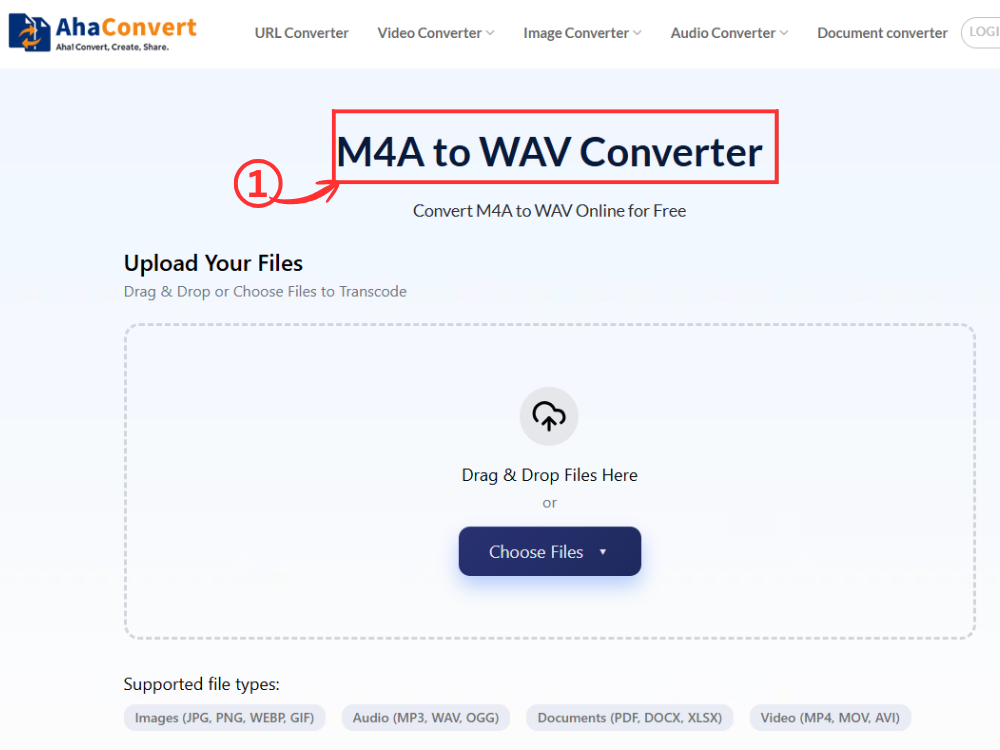
Step 1: Open the AhaConvert M4A to WAV Converter
Open the AhaConvert M4A to WAV converter website from any internet browser on your computer. The site loads in a second or two regardless of whether you use Windows, Mac, Linux, or a mobile device.
Step 2: Upload Your M4A File
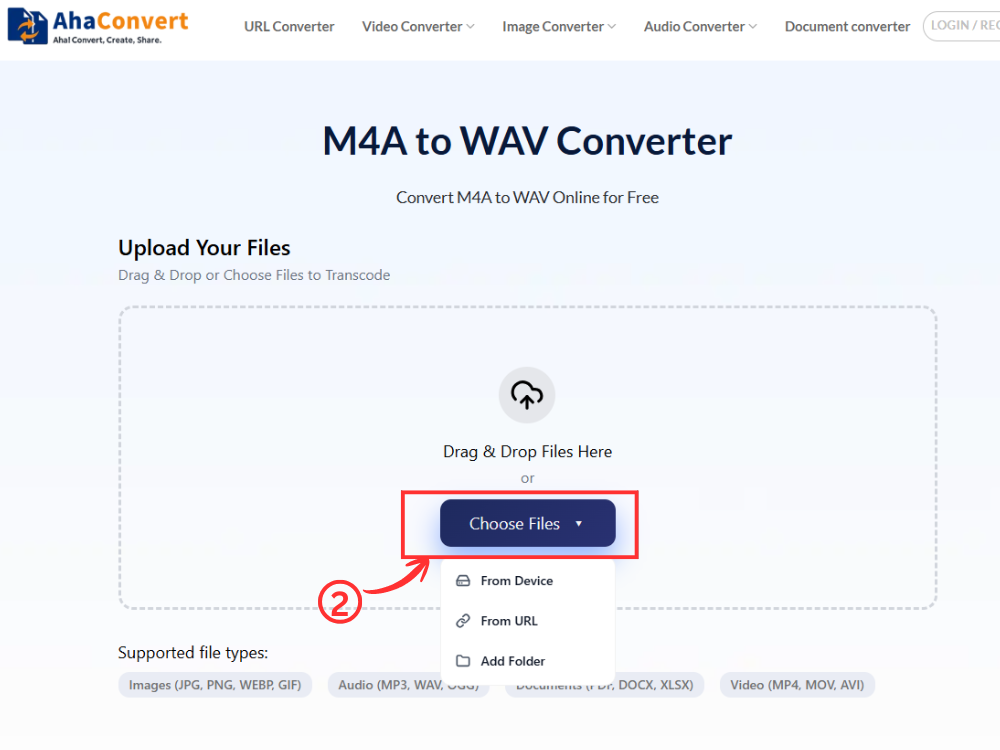
Click on “Choose Files” to browse your computer for your M4A file. You can also drop your file into the upload area, copy and paste its URL if the file is hosted online, or even upload from cloud services.
Step 3: Start the Conversion
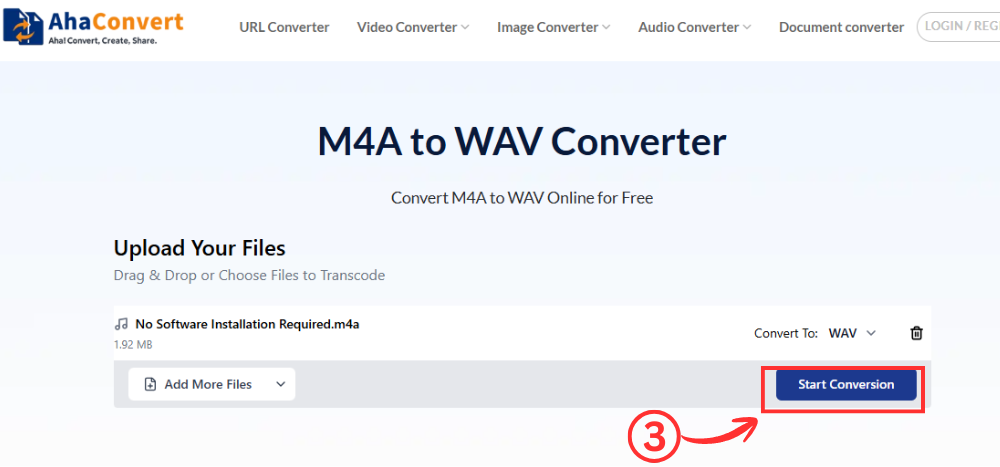
After uploading your file, click the “Start Conversion” button. This is an M4A to WAV converter, so the output format is already selected as WAV – no need for a format drop-down menu here. It starts converting your file right away.
Step 4: Download Your WAV File
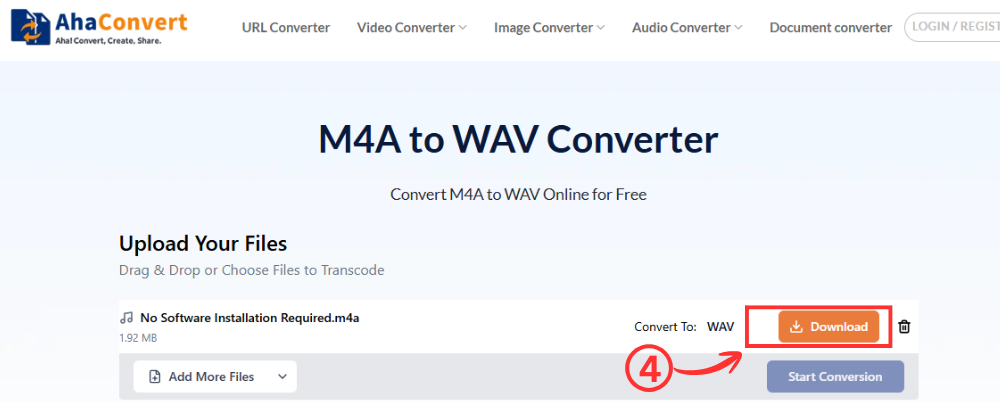
Once the conversion is finished, a download button will be available on the page. Clicking the “Download” button will allow you to directly download your WAV file to your computer. The download time required will usually only last a couple of seconds for ordinary M4A files, although large ones may take a little more time.
Frequently Asked Questions
a. Is it free to convert M4A to WAV online?
Yes. Many browser-based M4A to WAV converters are available for free. They allow users to upload an M4A file, convert it to WAV, and download the result without installing additional software.
b. Which is better: M4A or WAV?
Neither can be said to be superior in all aspects. The M4A format scores higher in terms of file size, while WAV is best for compatibility and editing. The deciding factor between the M4A vs WAV debate will depend on whether the music has to be archived or edited, and the latter is usually when converting M4A to WAV takes place.
c. Can I convert M4A to WAV on my iPhone or Android phone?
Yes. Most online M4A to WAV converters work directly in a web browser, making them accessible from iPhone, Android, Windows, macOS, and other devices without installing an application.
d. Is it safe to use an online M4A to WAV converter?
Yes, provided you use a trusted online converter. Look for services that use encrypted file transfers and automatically remove uploaded files after processing to help protect your privacy.
e. Does converting M4A to WAV improve audio quality?
No, because even when the original M4A file has been encoded using the lossy compression format, converting M4A to WAV would not be able to restore any of the data that has been lost. The new WAV file would still have the same quality as the original M4A file.
f. How long does it take to convert M4A to WAV?
Conversion time usually takes just a few seconds. Larger file sizes or batch conversions might take a little longer, but AhaConvert’s cloud-based conversion system makes it quick and efficient without keeping your browser tab open.
In Conclusion
The option of choosing whether to use M4A vs WAV depends on how you are going to use the file in question. The benefit of using M4A is that you can make your file smaller. However, when working on the editing and production side, it would be safer to go with WAV. Changing M4A to WAV whenever necessary is done in just a few mouse clicks.
There’s no need for you to be confused about using either M4A vs WAV in your everyday routines. If you’re just interested in listening to music or voice notes, then M4A is preferred due to the small file size it offers.
However, if you intend to edit, mix, upload to websites that require WAV, or use software that isn’t compatible with M4A, converting it to WAV is the right choice. An online M4A to WAV converter lets you convert your files without installing any software. AhaConvert audio converter also supports hundreds of other audio format conversions, making it easy to handle all your conversion needs in one place.
